
ads
How to Access Caixa Trabalhador
Accessing Caixa Trabalhador is simple and can be done in two ways: through the mobile application or through the official website. Below, in the Complete Caixa Trabalhador Guide, you will have access to a detailed step-by-step guide on how to use each of these options available in this tool:
1. Access via the Application:
- Get the app: The first step is to download the Caixa Trabalhador application, available for both devices Android (PlayStore) how much for iOS (App Store). Just access the app store on your cell phone, search for “Caixa Trabalhador” and download it.
- Registration and Login: After installing the application, open it and log in using your CPF and registered password. If you are not yet registered, follow the steps below and register through the application.
- Navigation: Once logged in, you will have access to the main menu, where you can browse the different options available, such as FGTS balance consultation, PIS payment calendar, and much more.
2. Access via the Website:
- Go to the official website: To use Caixa Trabalhador via the web, access the official website of Caixa Econômica Federal.
- Login: Just like the application, you will need to log in with your CPF and password.
- Exploration of features: Once logged in, you will have access to all available features, being able to navigate the portal and consult your information with ease.
The access process is simple, but essential for workers to have full control over their benefits. By ensuring you know how to use these tools, you will be better informed and prepared to make decisions related to your employment rights.
Step-by-Step Caixa Employee Registration
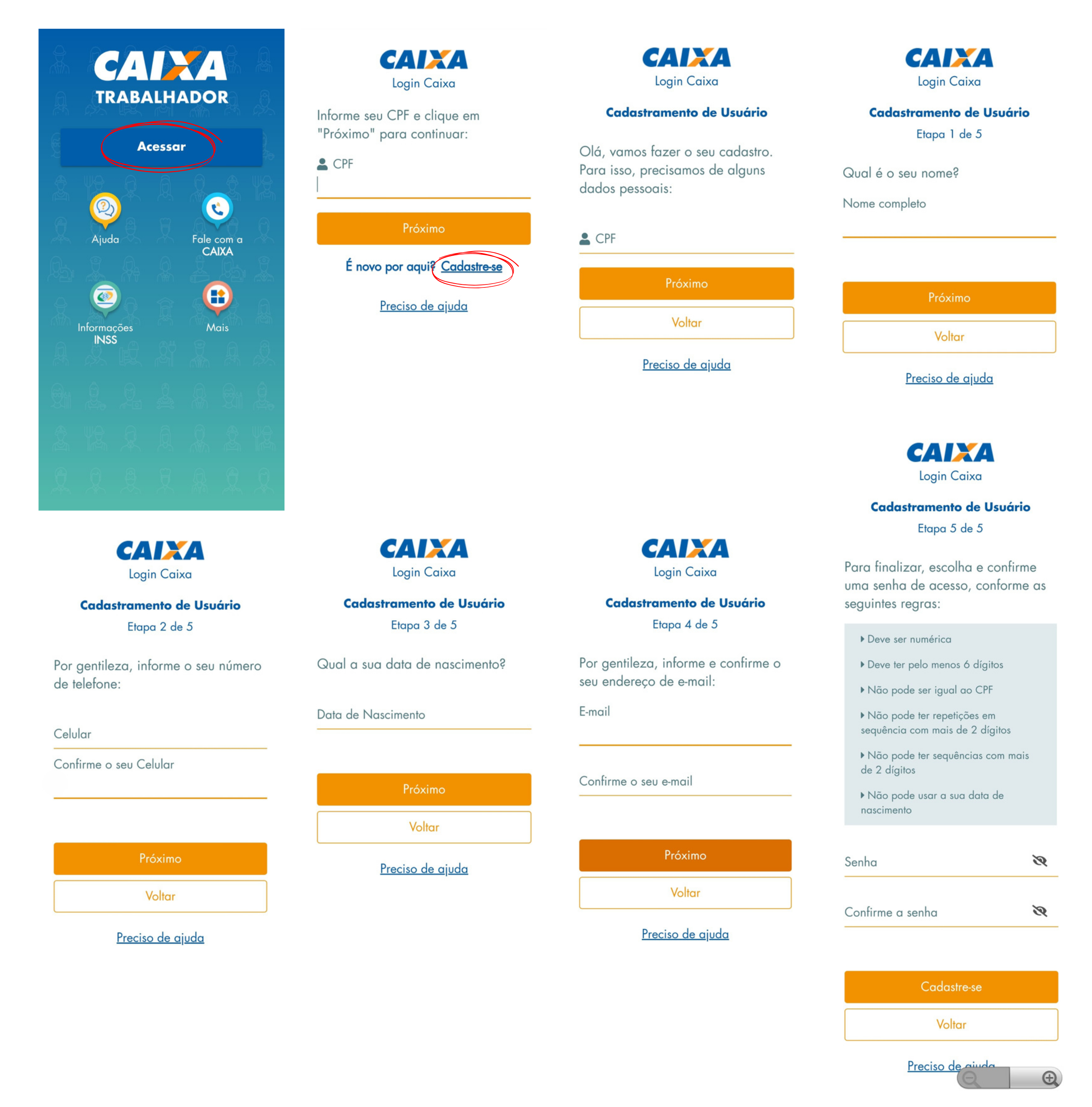
- Open the Caixa Trabalhador App from the app icon on your home screen or app menu.
- Accept the Terms of Use and Privacy policies the first time you open the application. Read them carefully and tap “Accept” to continue.
- On the application's home screen, click “Access”.
- On the next page, select the “Register” option.
- Start your registration by providing your personal details (CPF, Full Name, Cell Phone Number and Date of Birth).
- Enter and confirm your email that you will use to register your account.
- Create a 6-digit numeric password following the application's instructions.
- You will receive a confirmation email.
- Confirm registration using the link you receive in your email.
- Ready! Your registration has already been done and now just follow the next steps to take advantage of all of Caixa Trabalhador’s features.