
Step by Step to Make an Appointment at INSS
Scheduling online
Step 1: Creation of a Gov.br Account
First of all, it is important to check if you are already registered on the gov.br website. It is with this registration that you will be able to access the official Meu INSS website and browse all the services offered by the website. If you have not registered, follow the steps below:
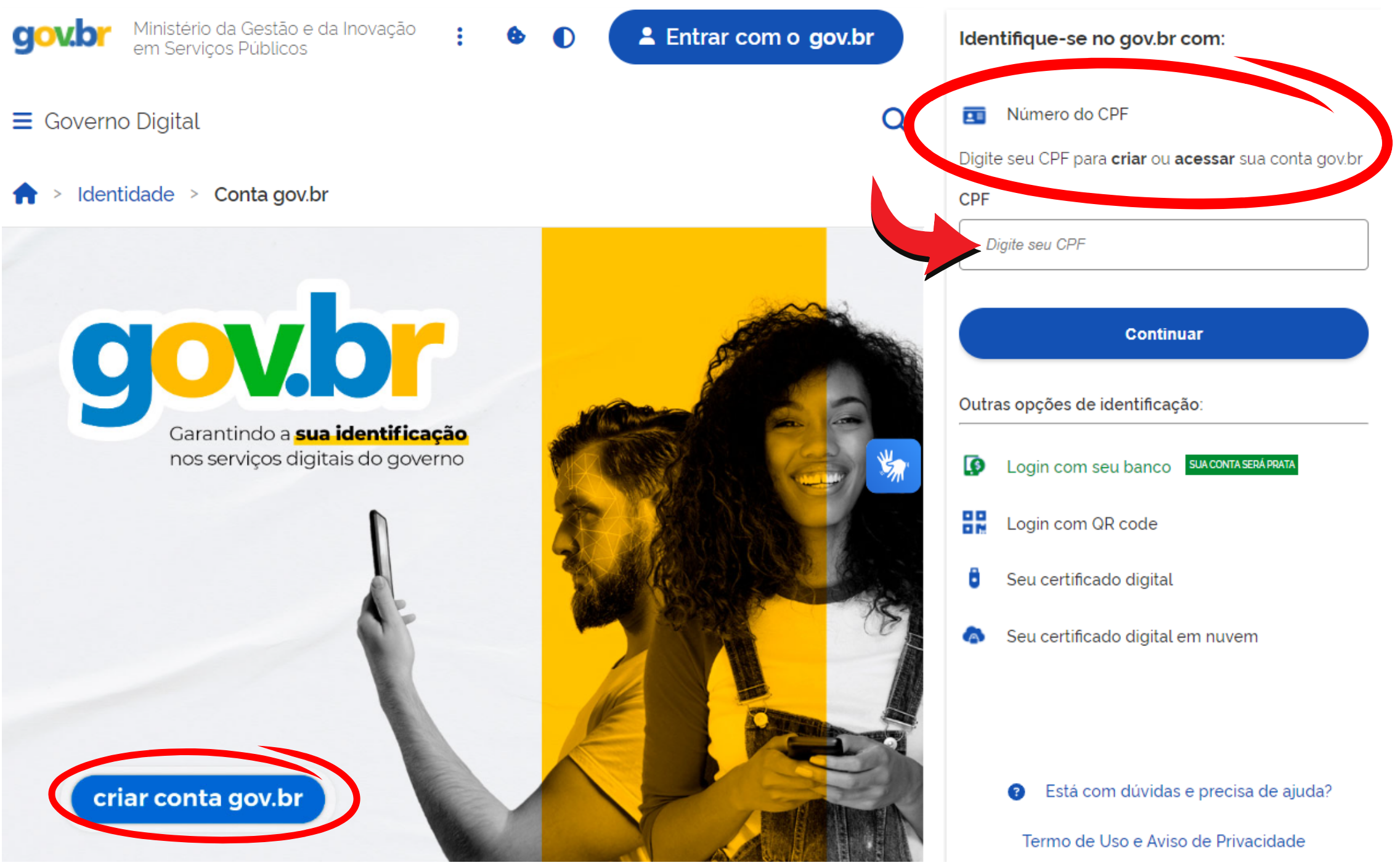
- To create your account, visit the official website gov.br.
- On the home page, click on the “create gov.br account” button.
- On the access page, enter your CPF in the indicated field and click “continue”.
- Follow the registration instructions and provide your personal data.
- After filling in the data, click on “Register”.
- You will receive a confirmation email at the address you provided.
- Open the email and click on the validation link to confirm your registration.
- After validating your email, return to the Gov.br website.
- Create a secure password.
- Log in with your CPF and the password you created.
Step 2: Access to the My INSS website
- On your computer or tablet, access the My INSS official website.
- On the home page, click on “Login with gov.br” and access the website with your gov.br login.
Step 3: Choosing the Type of Appointment
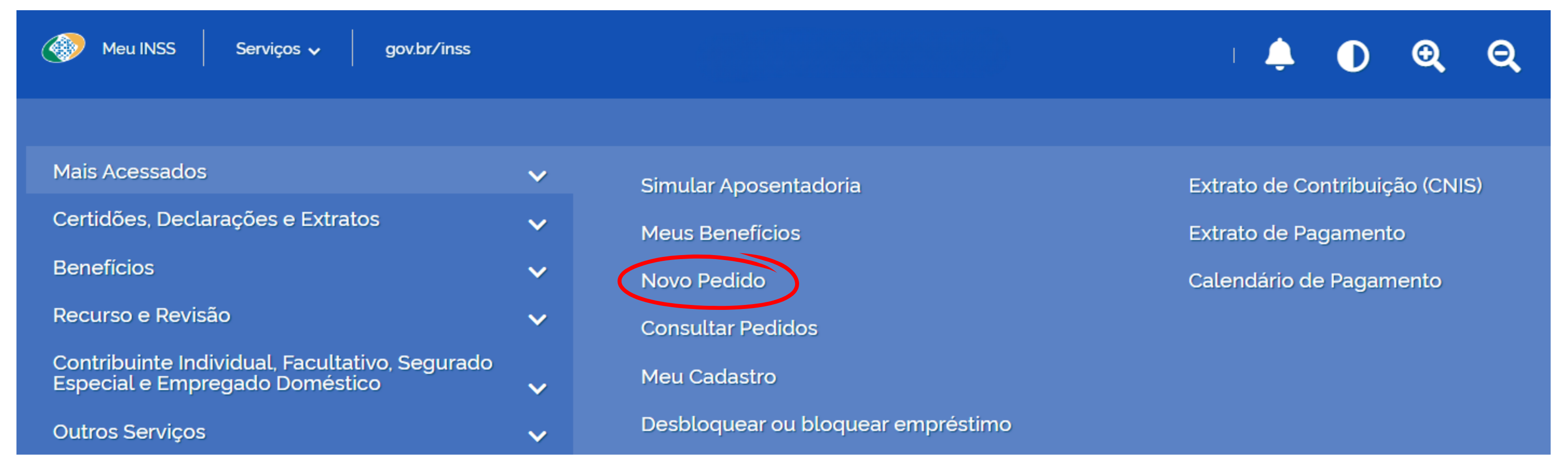
- In the My INSS main menu, search for “Services”.
- Hover over the “Most Accessed” option.
- Click on “New Order”.
- You will be directed to a list of services offered by INSS.
- Select the type of service you want to schedule.
- Click “Continue”, you will be directed to the next step.
Step 4: Scheduling
- You will be taken to a form where you must provide personal information and details about the service requested.
- Fill in the requested information.
- Review your details and the request details.
- If it is a service provided in person, select the available date and time that best suits you.
- Click “Confirm Appointment”.
- You will receive a confirmation email with your appointment details and information.
- You will be able to print or save your schedule as a PDF on your computer.
Step 5: Follow-up and Preparation
- Check your email regularly for any updates or notifications about your appointment.
- Prepare the necessary documentation such as ID, CPF, proof of residence, and other specific documents for the scheduled service.
- Review the additional requirements you must meet prior to service.
- Attend the appointment on the day of your appointment, arrive in advance and bring all necessary documentation.
Scheduling over the phone
For those who do not have access to the internet, there is the possibility of scheduling an INSS service over the phone, simply call 135. The service is available from Monday to Saturday, from 7am to 22pm, but electronic service is available 24 hours a day , every day of the week. During the call, follow the instructions provided by the electronic attendant or speak to one of the attendants to make the appointment.
Step 1: Required Documents and Information:
- RG and CPF number.
- NIS/PIS/PASEP number.
- Complete address of the beneficiary.
- Personal information such as parents' names, date of birth and level of education.
- Information about your Benefit (if you are already an INSS beneficiary).
Step 2: Who Can Make the Schedule:
- The insured himself.
- Legal representative, having all documents and information of the insured in hand.
Step 3: Scheduling Procedure
- Call number 135.
- Wait to be answered by an attendant or follow the electronic service instructions if you call outside opening hours.
- Provide the requested service information.
- Specify the type of service you want to schedule.
- Confirm your details and make a note of the appointment.
- If your request is for in-person assistance, attend the INSS agency on the scheduled day and time, carrying the necessary documentation.
Scheduling at a Physical Agency
Step 1: Required Documents and Information
- Original personal identification document with photo (RG/CPF/CNH)
- Proof of recent residence (water, electricity, telephone or credit card account).
- Benefit Number or PIS/PASEP.
- Telephone and/or email for contact.
Step 2: Who Can Make the Schedule
- The insured himself.
- Legal representative, having in hand all the documents and information of the insured and the documentation that proves the representation, such as power of attorney or guardianship.
Step 3: INSS Opening Hours
Check INSS's in-person opening hours. INSS agencies generally operate from Monday to Friday, from 8am to 20pm, and opening hours to the public are Monday to Friday, from 8am to 12pm and from 14pm to 18pm, except holidays. However, it is important to check the specific opening hours of the nearest branch, as there may be variations.
Step 4: Scheduling Procedure
- Go to the nearest INSS agency.
- Collect a password at the service desk.
- Wait to be called for assistance.
- Request an appointment. Inform the type of service you need to schedule and present the necessary documents.
- Confirm the appointment and collect the receipt with the scheduled date and time from the attendant.
This guide aims to facilitate access to INSS services, ensuring that you can receive the necessary assistance in an organized and efficient manner. If you need more information or assistance, consult INSS support or the online help portal.
Conclusion
Now that you know all the steps to schedule an INSS appointment, the process should be much clearer and simpler. By following this detailed guide, you can ensure efficient service and avoid future problems. Be sure to review each step carefully and prepare appropriately for your appointment.