
How to Access the My INSS Portal
To use the services offered by Meu INSS, you must register on the platform. The registration process is simple and can be done online by following these steps:
- Access the INSS Official Website
- Enter the address of the official INSS website in the address bar or just click on the link: www.meu.inss.gov.br.
- Enter the address of the official INSS website in the address bar or just click on the link: www.meu.inss.gov.br.
- Login
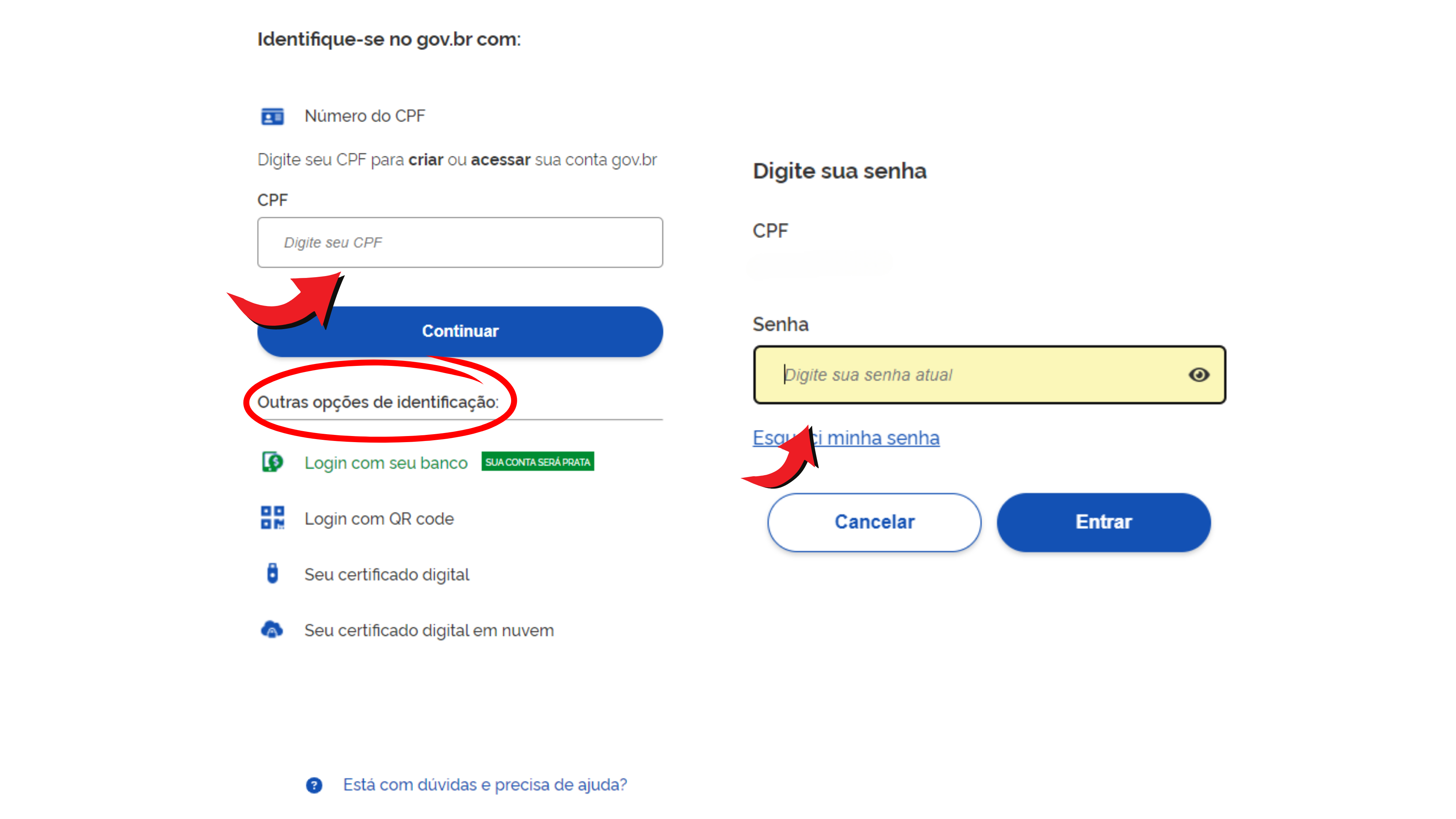
- On the home page of the Meu INSS website, click on the “Enter with gov.br” button.
- You will be redirected to a login page, which is done with your gov account.
- In the corresponding fields, enter your CPF and password registered on the gov.br website.
- Click the “Sign In” button to access your account.
- You may also log in to the website with other forms of personal identification, such as:
- Login with your bank (Bank of Brazil, Itau, Caixa Economica, Bradesco, Santander, PicPay/Original, Nubank, Sicoob, Sicredi, Banrisul, Agibank, Bank of Brasilia, Banco Mercantil and BTG Pactual).
- Login with digital certificate (for professionals and companies with digital certification).
- Login with QRCode (available through your gov.br app).
- Login with digital certificate in the cloud.
Step by Step on How to Issue the Statement on My INSS
Through the My INSS portal, taxpayers have access to their Contribution (CNIS) statements, Payments, Loans, Income Tax and, even, Benefit Information aimed at INSS beneficiaries.
Therefore, it is important to clarify that the procedure for obtaining any of these statements is the same, therefore, simply follow the step by step below to obtain the INSS statement which best fits your needs.
- Access the Statements Section:
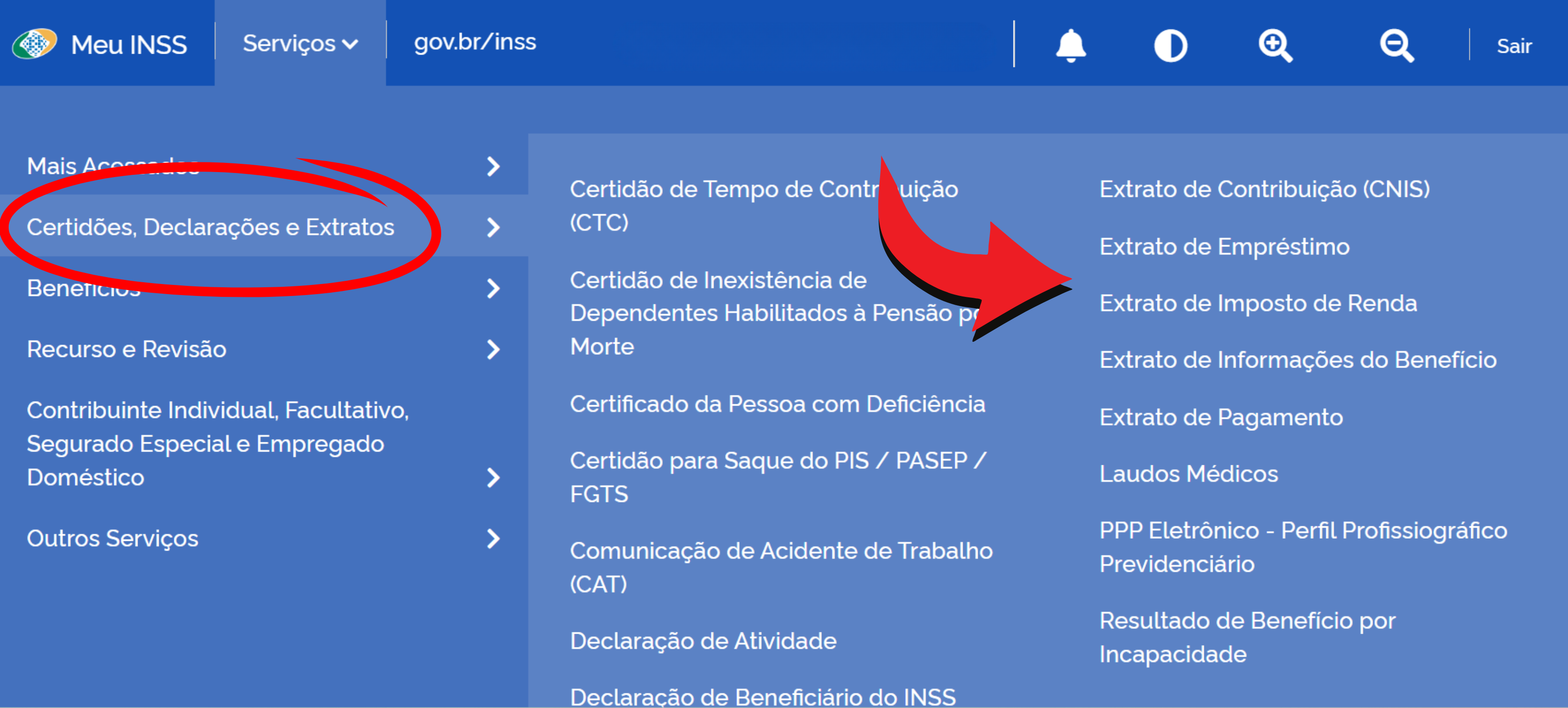
- After logging into the Meu INSS portal, look for the main menu or navigation bar.
- Search for the “Services” option.
- Hover over the option “Certificates, Declarations and Statements”.
- Select the Statement Option:
- Within the statements section, you will see several options related to your benefits.
- Select the type of statement that matches your needs by clicking on the desired option.
- You will be directed to your statement page.
- You will be directed to your statement page.
- Generate your document
- After selecting the type of statement, on the final statement page, scroll down the page and at the end click on the “Download Document” button.
- A window will appear with information options for your statement.
- Click on the desired option.
- Please wait while the system processes your order. This may take a few seconds.
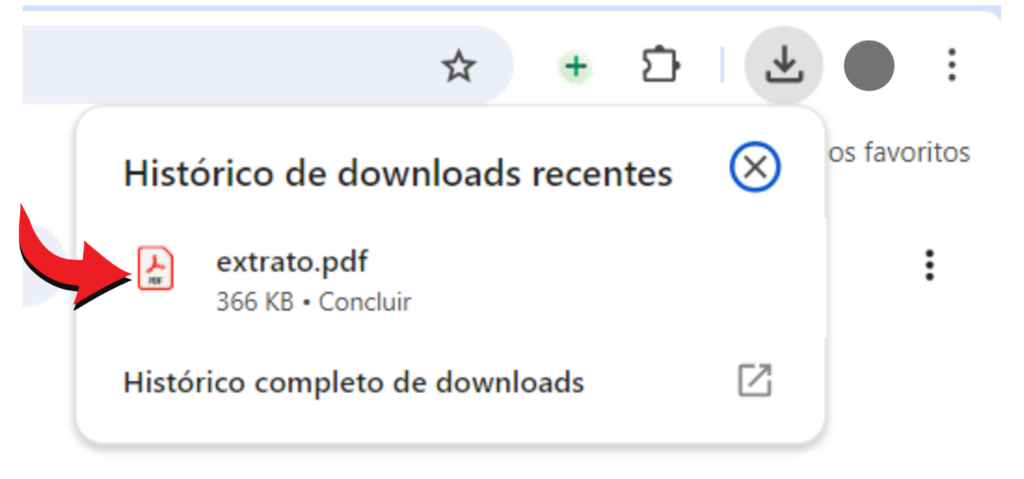
- Ready! Your document will be automatically downloaded and saved as a PDF.
- View the Statement:
- The statement will be displayed on the screen in PDF format.
- You can view it directly in your browser by clicking the download icon in your browser.
- If you cannot see it on the browser's download icon, look for the document titled “Extract” in the “Download” folder on your computer. Double click and open your document in PDF format.
- If you prefer, you can also print your statement.
By following the step-by-step instructions, you will be able to access the INSS portal and issue your Meu INSS statement quickly and easily. Make sure you follow each step carefully to avoid problems during the process.
Important Tips:
- Keep Your Data Updated: Please ensure that all information provided is correct and up to date.
- Keep Your Password Safe: Write down your password in a safe place or use a password manager so you don't forget it.
- Answer Security Questions Correctly: The questions are based on your history with INSS and must be answered correctly to complete registration.
Frequently Asked Questions
- How do I recover my INSS portal password? Go to the login page and click on “I forgot my password”. Follow the instructions to reset your password.
- What to do if I can't access the portal? Check your internet connection and try again. If the problem persists, contact INSS technical support.
- Can I issue the statement via cell phone? Yes, the INSS portal is accessible via cell phone. Just follow the same steps described above.
Conclusion
Knowing how to obtain your statement on My INSS is an important step towards the efficient management of your benefits. By following the detailed instructions above on how to obtain your statement on My INSS , you will be able to access My INSS services and easily obtain the statement you need. Be sure to regularly check your information to ensure everything is in order. Continue browsing and explore our content to learn how to access other My INSS services and get many other useful tips!